


Survey and Data Collection Management System
Survey and Data Collection Management System
Manage your organization's need to collect and analyze data through surveys, including field operations, from a single place. Run dynamic questions, survey field management, and detailed analytics on a GIS-based foundation.
OverviewExplore
How Survey and Data Collection Management System Works
Survey and field management, dynamic question creation, geographic control, reporting, and analytics are all managed within the same corporate structure.
Survey ManagementDynamic Survey and Field Data Management
Overview
Manage Your Processes on a Single Platform with Survey and Data Collection Management System
Survey and Data Collection Management System is a web-based survey and field data management platform developed for public institutions and private organizations, built on a dynamic form design and rule engine infrastructure.
★
Survey and Data Collection Management System
360°
provides end-to-end digital process management
Survey and Data Collection Management System is a web-based survey and field data management platform developed for public institutions and private organizations, built on a dynamic form design and rule engine infrastructure.
♦
Highlights
Survey and Field Management
Digitizes data collection, validation, and management processes end to end for household, socio-economic, and corporate research.
Digitizes data collection, validation, and management processes end to end for household, socio-economic, and corporate research.
0172%
0284%
Dynamic Form and Table Design
Question booklets and tables can be designed on a row/column basis; database connection, filtering, and conditional structures are supported.
Question booklets and tables can be designed on a row/column basis; database connection, filtering, and conditional structures are supported.
0178%
0288%
Rule Engine
Visibility, validation, and automatic calculation rules can be defined; they ensure consistency and control during data entry.
Visibility, validation, and automatic calculation rules can be defined; they ensure consistency and control during data entry.
0184%
0292%
Capabilities
The Survey and Field Data Collection Process
Managed from Start to Finish
- 01.Management DashboardA central control panel that summarizes the overall status of survey processes. It displays the total target households, the number of completed and remaining surveys, the field completion rate, and active surveyor information.
- 02.Definition ScreensReference and code definitions used in the system are managed centrally. Adding new definitions, updating records, changing active/inactive status, and bulk operations are supported.
- 03.Level-Based Definition ScreensHierarchical codes and classifications are managed on a level basis. Controlled transitions can be made between section, division, group, class, and subclass levels.
- 04.Tree Structure and Sub-Activity ManagementDefinitions are displayed together with their sub-activities within a hierarchical tree structure. Sub-breakdowns can be expanded and collapsed, and edits can be made at every level.
- 05.Cover Design and Form Configuration ScreenThe cover screen of surveys is created through this panel. The cover name, description, form title, status information, visual, and label components are configured.
- 06.Section Definition and Configuration ScreenThe survey form is configured on a section basis. The question flow is managed in a modular way by setting parent-section relationships, codes, sequence numbers, and titles.
Core Competencies
Modules that support Survey and Data Collection Management System operations
The core capabilities from the documentation were organized into corporate modules aligned with the product flow.
Go to OverviewManagement Dashboard
A central control panel that summarizes the overall status of survey processes. It displays the total target households, the number of completed and remaining surveys, the field completion rate, and active surveyor information.
Definition Screens
Reference and code definitions used in the system are managed centrally. Adding new definitions, updating records, changing active/inactive status, and bulk operations are supported.
Level-Based Definition Screens
Hierarchical codes and classifications are managed on a level basis. Controlled transitions can be made between section, division, group, class, and subclass levels.
Tree Structure and Sub-Activity Management
Definitions are displayed together with their sub-activities within a hierarchical tree structure. Sub-breakdowns can be expanded and collapsed, and edits can be made at every level.
Cover Design and Form Configuration Screen
The cover screen of surveys is created through this panel. The cover name, description, form title, status information, visual, and label components are configured.
Section Definition and Configuration Screen
The survey form is configured on a section basis. The question flow is managed in a modular way by setting parent-section relationships, codes, sequence numbers, and titles.
Capability Cards
Everything Survey and Field Data Collection Requires,
in a Single Platform
The main modules from the documentation were organized into corporate summary cards.
Management Dashboard
Management Dashboard
A central control panel that summarizes the overall status of survey processes. It displays the total target households, the number of completed and remaining surveys, the field completion rate, and active surveyor information.
Screens
Definition Screens
Reference and code definitions used in the system are managed centrally. Adding new definitions, updating records, changing active/inactive status, and bulk operations are supported.
Level Screens
Level-Based Definition Screens
Hierarchical codes and classifications are managed on a level basis. Controlled transitions can be made between section, division, group, class, and subclass levels.
Tree Structure
Tree Structure and Sub-Activity Management
The Tree Structure and Sub-Activity Management area lets you track, control, and manage the related process from a single screen in line with corporate workflows.
Cover Design
Cover Design and Form Configuration Screen
The Cover Design and Form Configuration Screen area lets you track, control, and manage the related process from a single screen in line with corporate workflows.
Section Configuration
Section Definition and Configuration Screen
The Section Definition and Configuration Screen area lets you track, control, and manage the related process from a single screen in line with corporate workflows.
Question Variable
Question Definition and Variable Configuration Screen
The Question Definition and Variable Configuration Screen area lets you track, control, and manage the related process from a single screen in line with corporate workflows.
Skip Rules
Skip Rules and Conditional Routing Screen
The Skip Rules and Conditional Routing Screen area lets you track, control, and manage the related process from a single screen in line with corporate workflows.
Resources
Explore our promotional materials
Access presentation and promotional content about Survey and Data Collection Management System from this area.
Product Tour
Explore Survey and Data Collection Management System
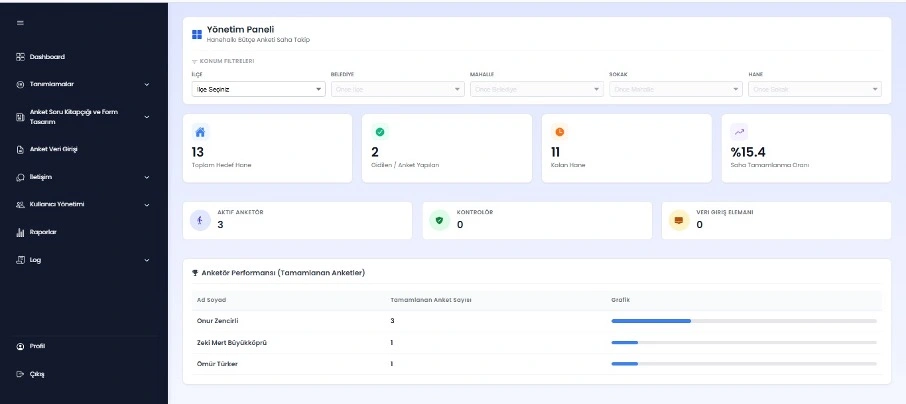
Management Dashboard
A central control panel that summarizes the overall status of survey processes. It displays the total target households, the number of completed and remaining surveys, the field completion rate, and active surveyor information.
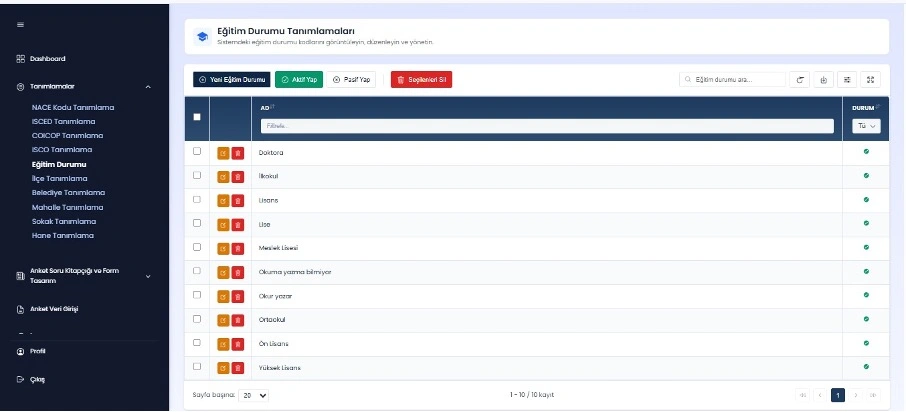
Definition Screens
Reference and code definitions used in the system are managed centrally. Adding new definitions, updating records, changing active/inactive status, and bulk operations are supported.
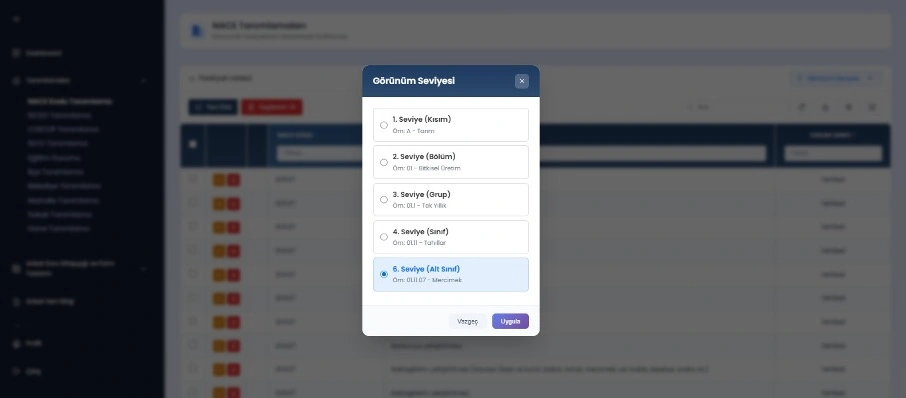
Level-Based Definition Screens
Hierarchical codes and classifications are managed on a level basis. Controlled transitions can be made between section, division, group, class, and subclass levels.
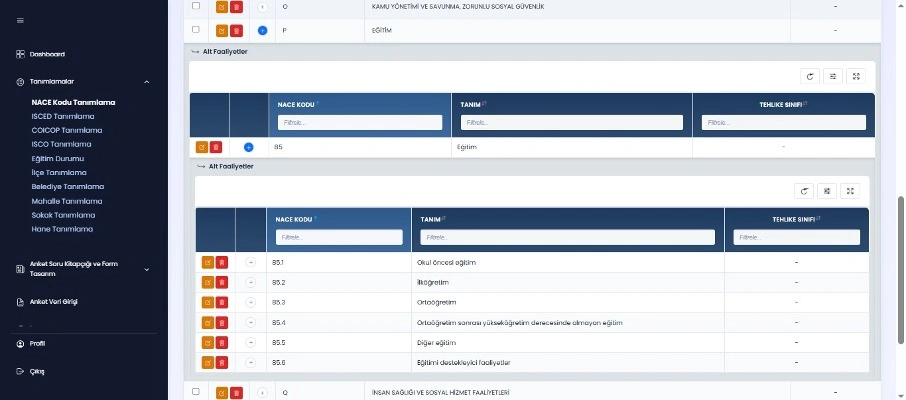
Tree Structure and Sub-Activity Management
Definitions are displayed together with their sub-activities within a hierarchical tree structure. Sub-breakdowns can be expanded and collapsed, and edits can be made at every level.
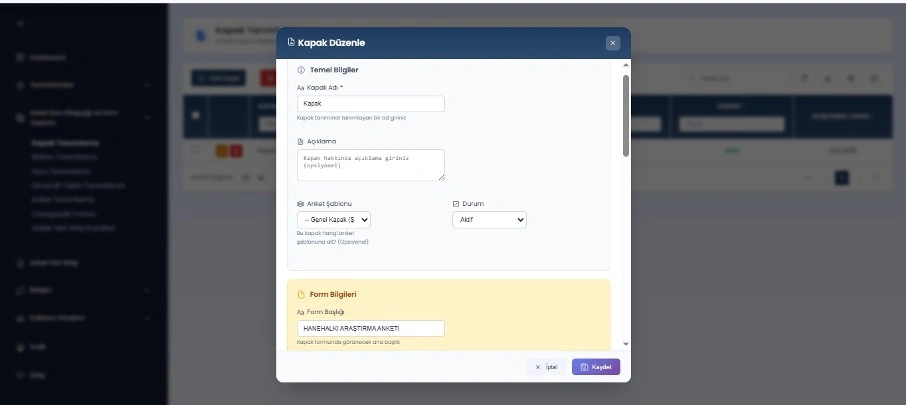
Cover Design and Form Configuration Screen
The cover screen of surveys is created through this panel. The cover name, description, form title, status information, visual, and label components are configured.
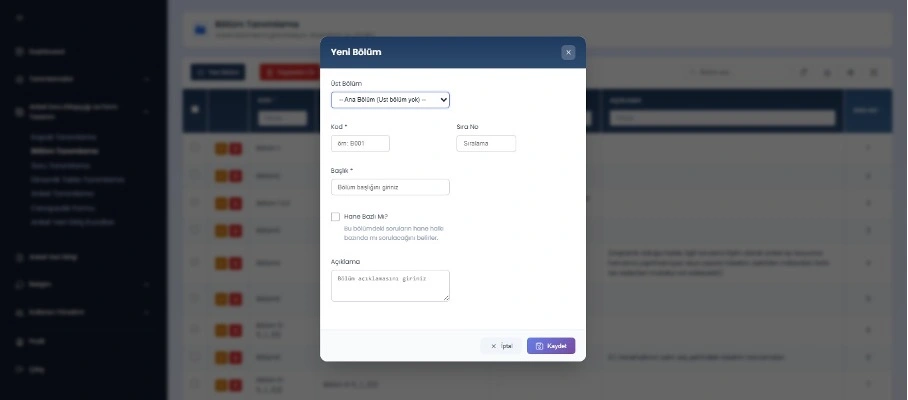
Section Definition and Configuration Screen
The survey form is configured on a section basis. The question flow is managed in a modular way by setting parent-section relationships, codes, sequence numbers, and titles.
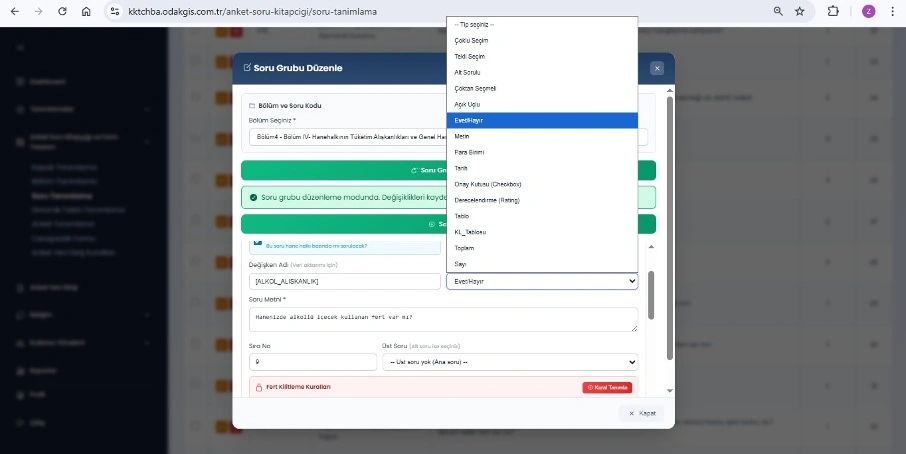
Question Definition and Variable Configuration Screen
Each question in the survey is defined, and a unique variable name is assigned to it. The question type, mandatory status, and household-individual application information are managed.
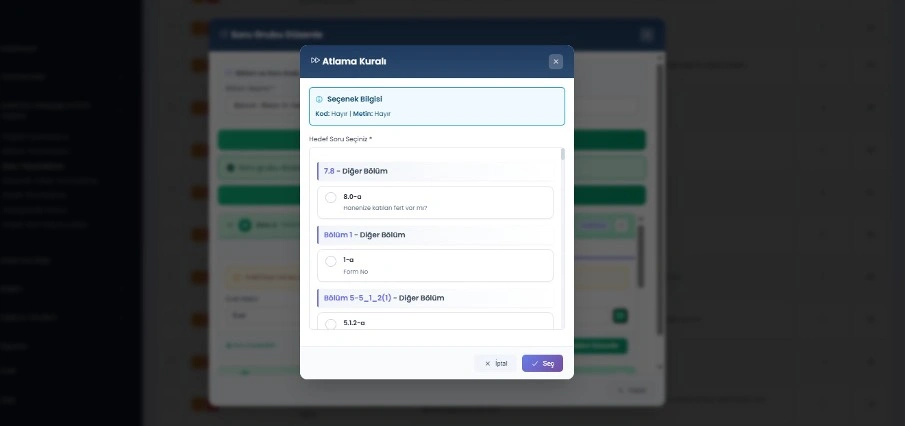
Skip Rules and Conditional Routing Screen
Skip rules tied to questions are defined so the survey flow is managed dynamically. Based on the answer given, the user is directed to the relevant question or section.
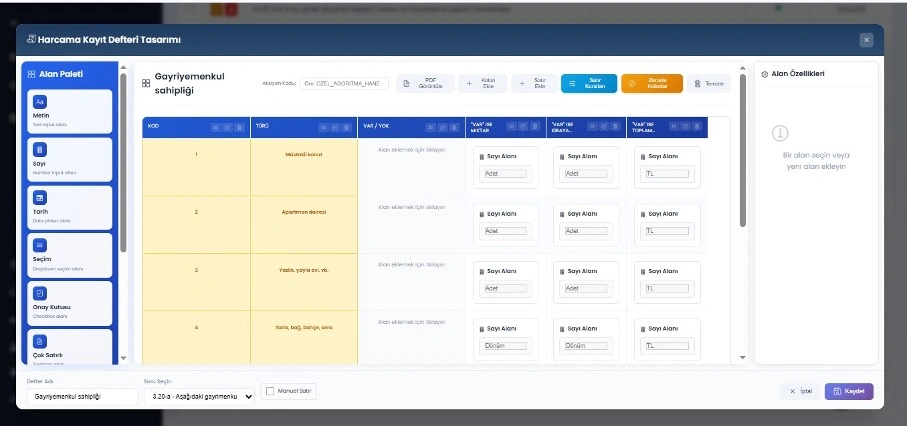
Dynamic Table and Data Modeling Design Screen
Flexible tables whose rows and columns can be managed dynamically are created. Database connection, filtering, and advanced data validation rules are supported.
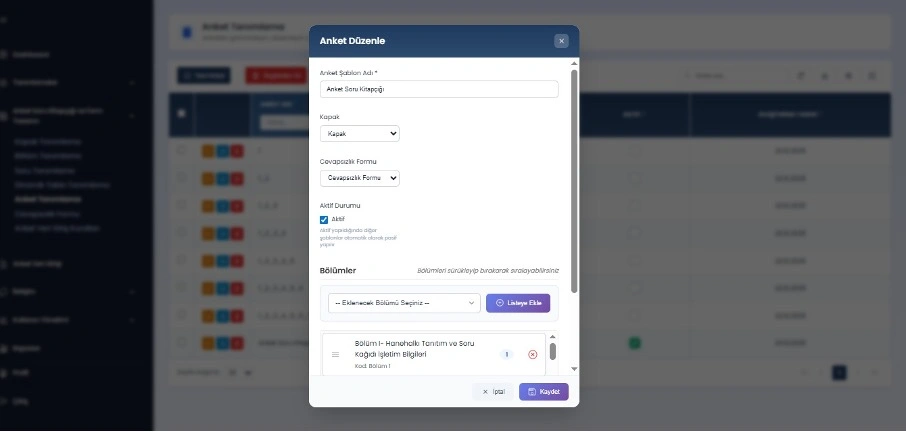
Survey Definition and Flow Management
The created sections are ordered using drag and drop; core configurations such as the cover screen, non-response form, and active status are managed centrally.
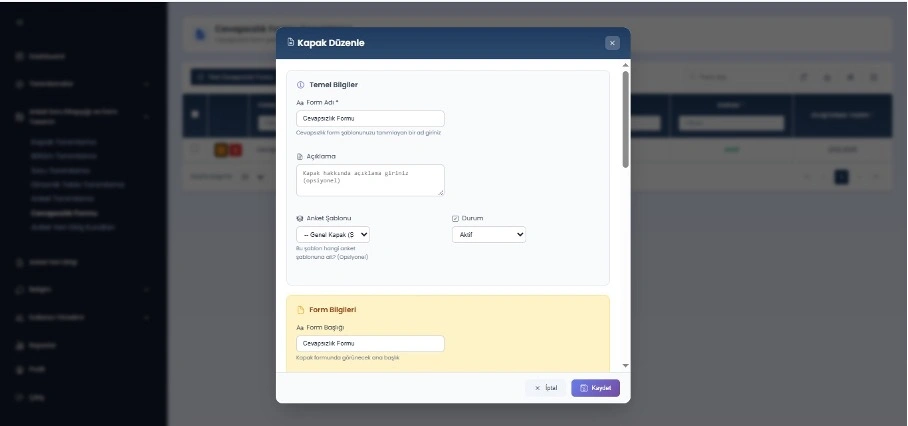
Non-Response Form Design
A dedicated form, used in cases such as no response to the survey or no one being present in the household, is designed in a standard structure.
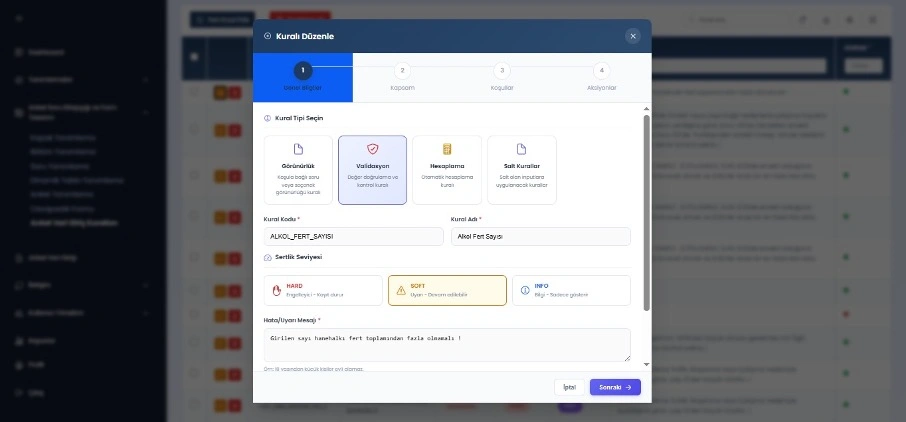
Rule Definition Screen
Visibility, validation, calculation, and custom business rules are defined to safeguard the accuracy and consistency of the data entry process.
FAQ
Quick answers about Survey and Data Collection Management System
The product's core use cases and corporate contribution are summarized here.
Get in TouchSurvey and Data Collection Management System is a web-based survey and field data management platform developed for public institutions and private organizations, built on a dynamic form design and rule engine infrastructure.
It digitizes data collection, validation, and management processes end to end for household, socio-economic, and corporate research.
Visibility, validation, and automatic calculation rules can be defined; they ensure consistency and control during data entry.
It offers a secure and traceable structure with role-based authorization, JWT authentication, and detailed transaction logs.
Dynamic reports can be generated from questions, tables, and surveys; multi-dimensional analysis is possible with charting and filtering options.
Manage your organization's need to collect and analyze data through surveys, including field operations, from a single place. Run dynamic questions, survey field management, and detailed analytics on a GIS-based foundation.
Survey and Data Collection Management System
Digitize Your
Processes, Increase Control
Survey and Data Collection Management System is a web-based survey and field data management platform with a dynamic form design and rule engine infrastructure, developed for public institutions and private organizations.
Survey and Field Management
Dynamic Form and Table Design
Rule Engine
Roles, Security, and Logging